
See more.
Touch nothing.
Daha çok gör.
Oyuna dokunma.
Sheen is a 372 KB Windows tool for color, shadows, crosshair, FPS counter and CS2 settings. It works from outside the game. Sheen; renk, gölge, nişangah, FPS sayacı ve CS2 ayarları için 372 KB'lık bir Windows aracı. Oyunun dışından çalışır.
Sheen.exe, free, Windows 10 and 11. No installer. Sheen.exe, ücretsiz, Windows 10 ve 11. Kurulum programı yok.
SHA-256 43a519ea97d41d56307bf8a516b5ad63f59cdaf886bf3b77dbe4e0fa782dd841
Sheen runs on Windows. Open this page on your PC to download it. Sheen Windows'ta çalışır. İndirmek için bu sayfayı bilgisayarında aç.
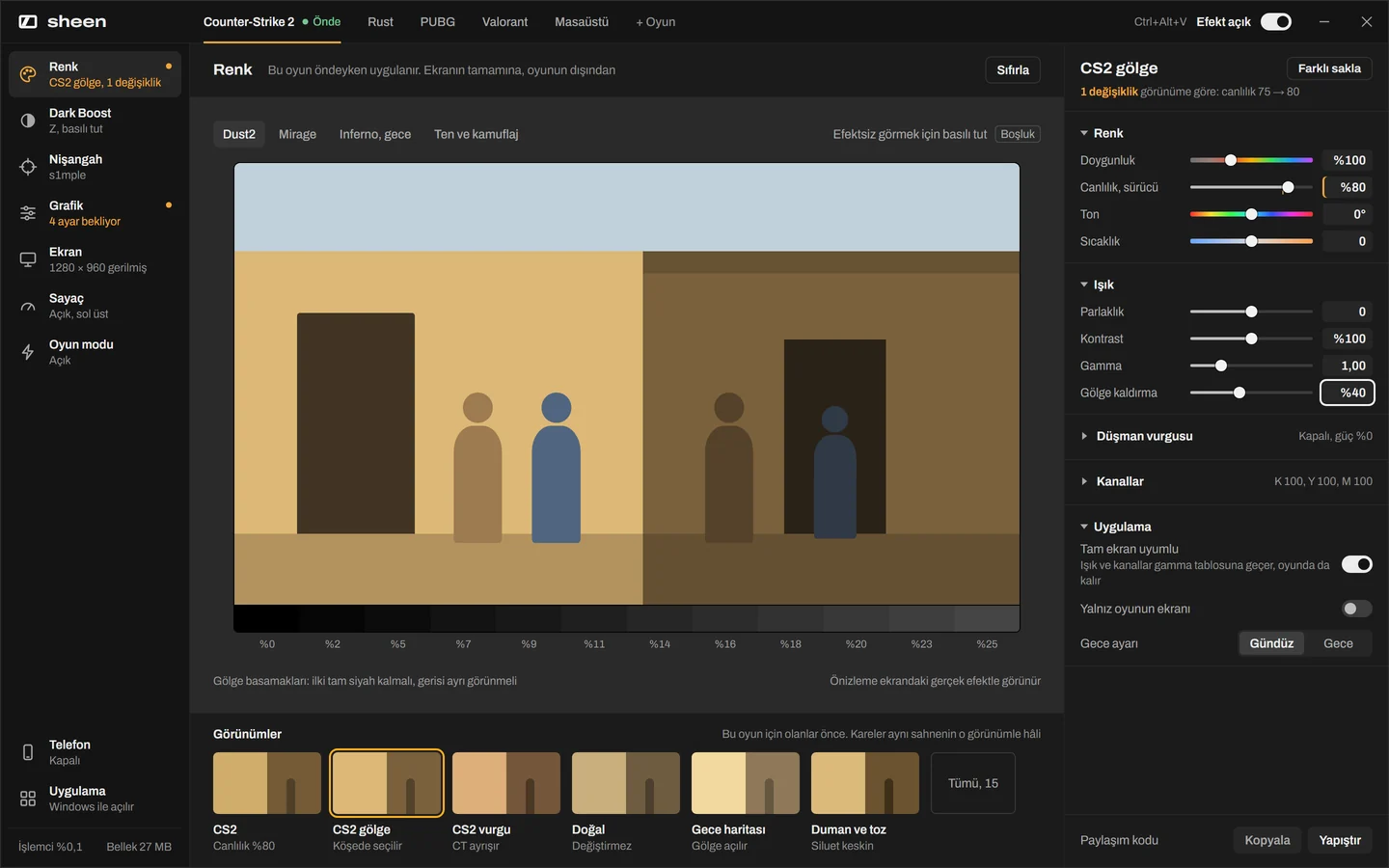
Colors that pop. Shadows that hide nobody. Canlı renk. Gölgede kimse saklanamaz.
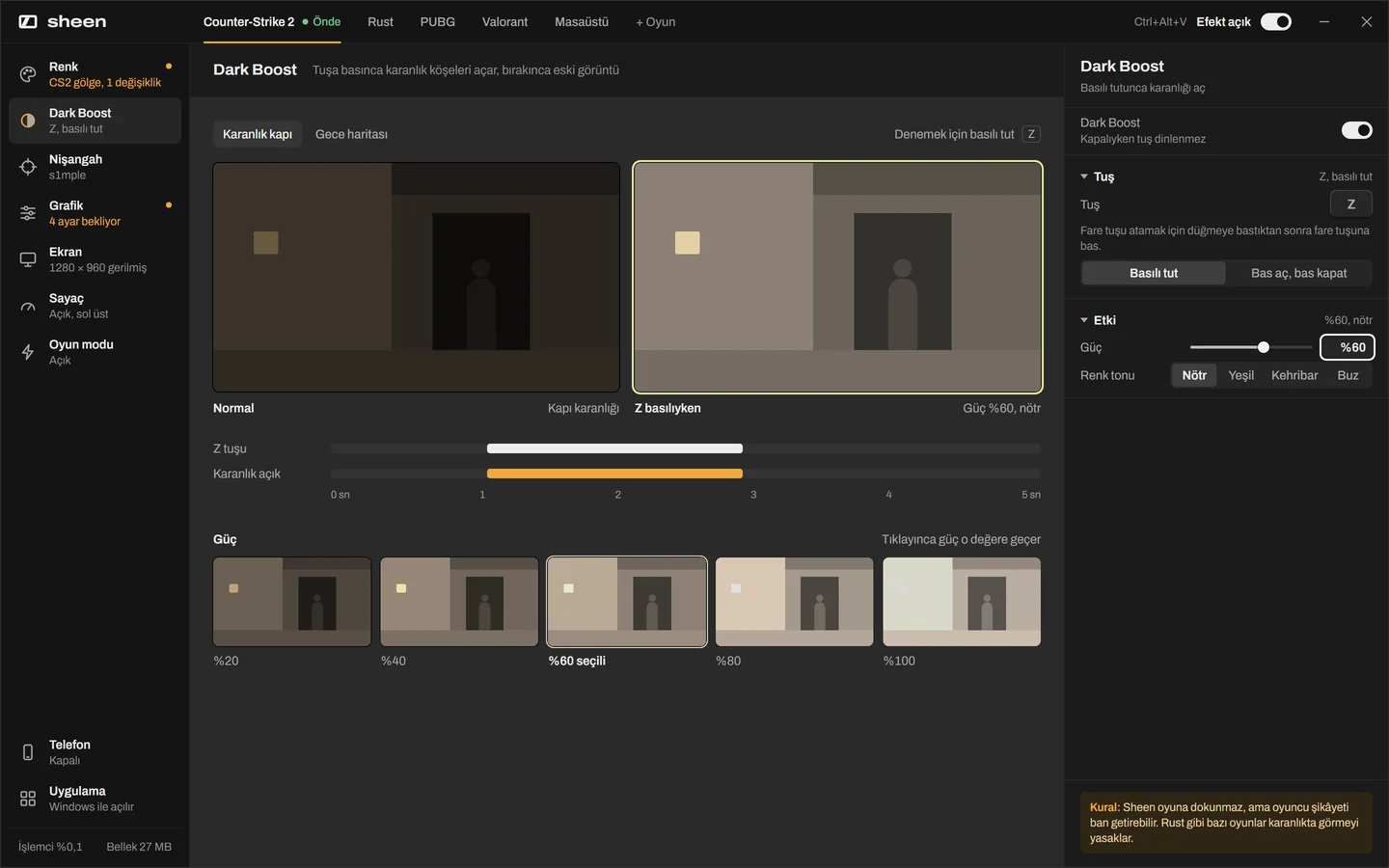
Raise vibrance through your AMD or NVIDIA driver, so it also works in exclusive fullscreen. Lift dark corners without washing out the sky. Canlılığı AMD ya da NVIDIA sürücüsünden yükseltir; özel tam ekranda da çalışır. Karanlık köşeleri açar, gökyüzünü soldurmaz.
Every game gets its own profile. When the game comes to the front, Sheen switches; when you alt-tab to the desktop, your normal colors come back. Ctrl+Alt+V turns the effect on and off. Her oyunun kendi profili var. Oyun öne gelince Sheen geçer, masaüstüne dönünce normal renkler geri gelir. Ctrl+Alt+V efekti açıp kapatır.
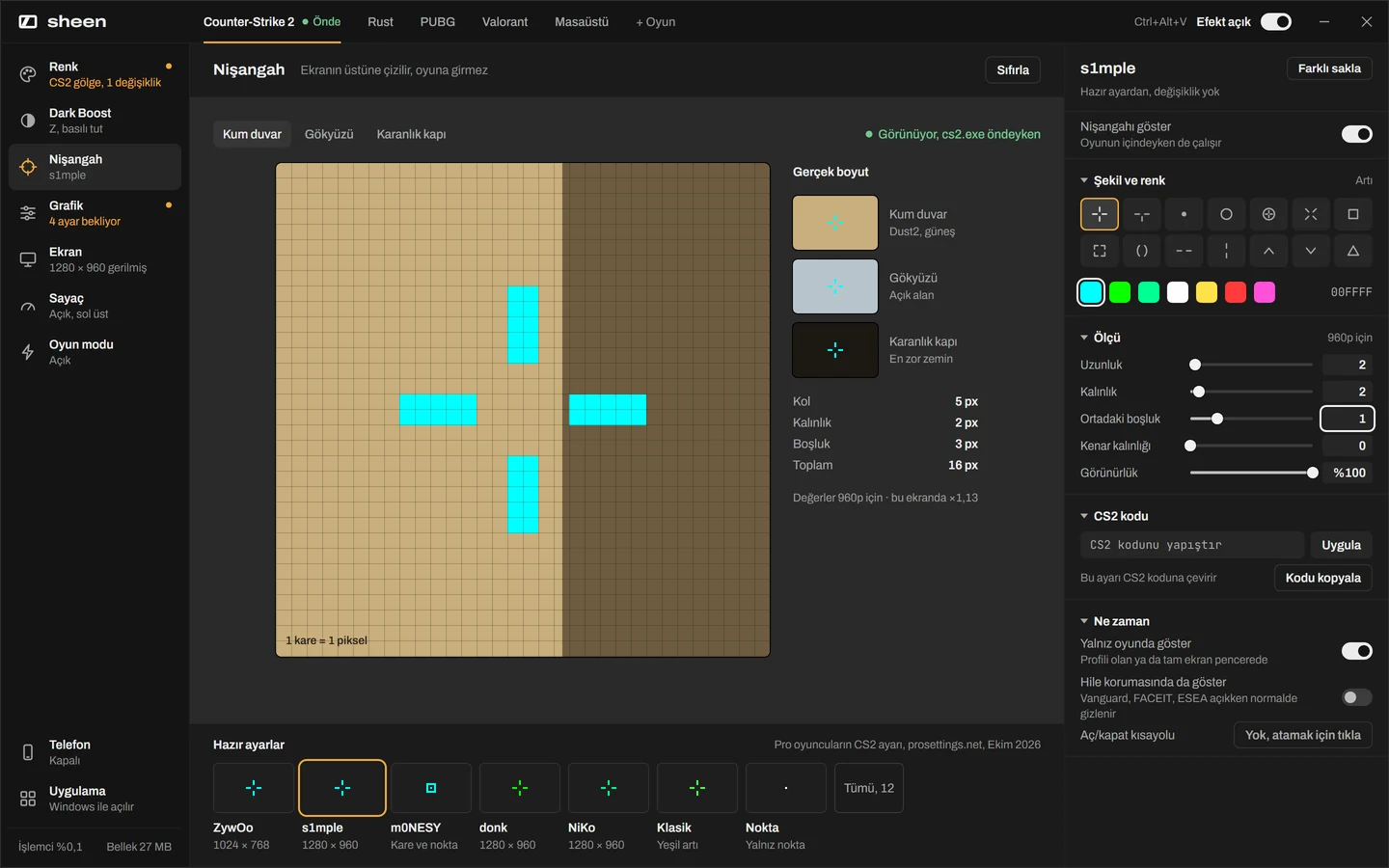
A crosshair that sits on top, not inside. Nişangah ekranın üstünde, oyunun içinde değil.
14 shapes, any color, sized for your resolution. Paste a CS2 crosshair code to copy it, or turn yours into a code to share. 14 şekil, istediğin renk, çözünürlüğüne göre ölçü. CS2 nişangah kodunu yapıştırıp aynısını al ya da kendi nişangahını koda çevirip paylaş.
Pro presets are in: ZywOo, s1mple, m0NESY, donk, NiKo. The overlay hides itself while Vanguard, FACEIT or ESEA is running, unless you turn that on. Pro hazır ayarları hazır: ZywOo, s1mple, m0NESY, donk, NiKo. Vanguard, FACEIT ya da ESEA açıkken katman kendini gizler; istersen açarsın.
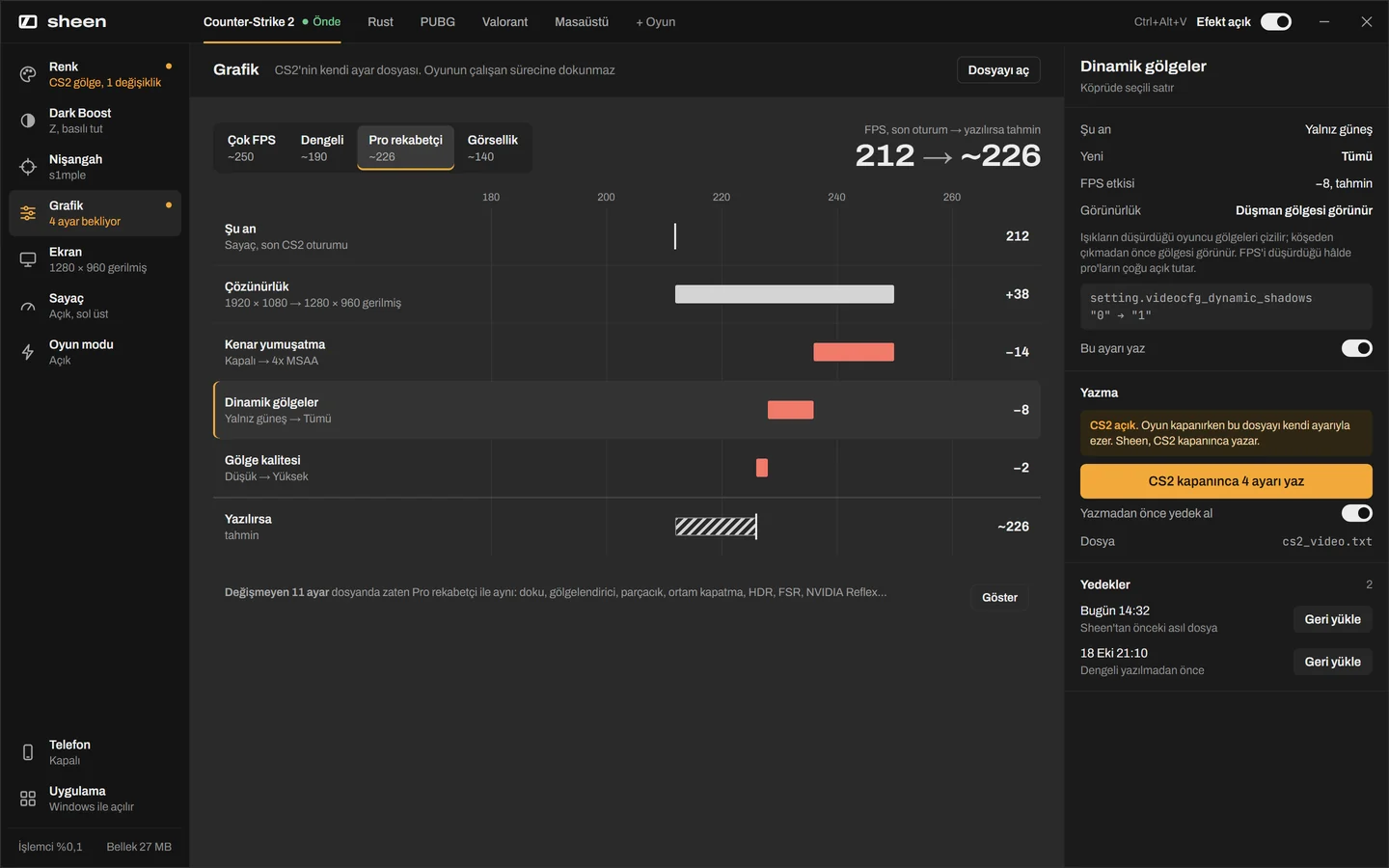
CS2 graphics the way the pros run them. CS2 grafiği, pro'ların kullandığı gibi.
Pick Max FPS, Balanced, Pro competitive or Visual. Sheen shows which settings change and roughly what each one costs or gains in frames. Çok FPS, Dengeli, Pro rekabetçi ya da Görsellik'i seç. Sheen hangi ayarın değiştiğini ve her birinin kabaca kaç kare kazandırıp kaybettirdiğini gösterir.
It edits CS2's own settings file, and only while CS2 is closed. Your original file is backed up first, so going back is one click. CS2'nin kendi ayar dosyasını düzenler, o da yalnız CS2 kapalıyken. Önce asıl dosyanı yedekler; geri dönmek tek tık.
setting.videocfg_dynamic_shadows "0" → "1"
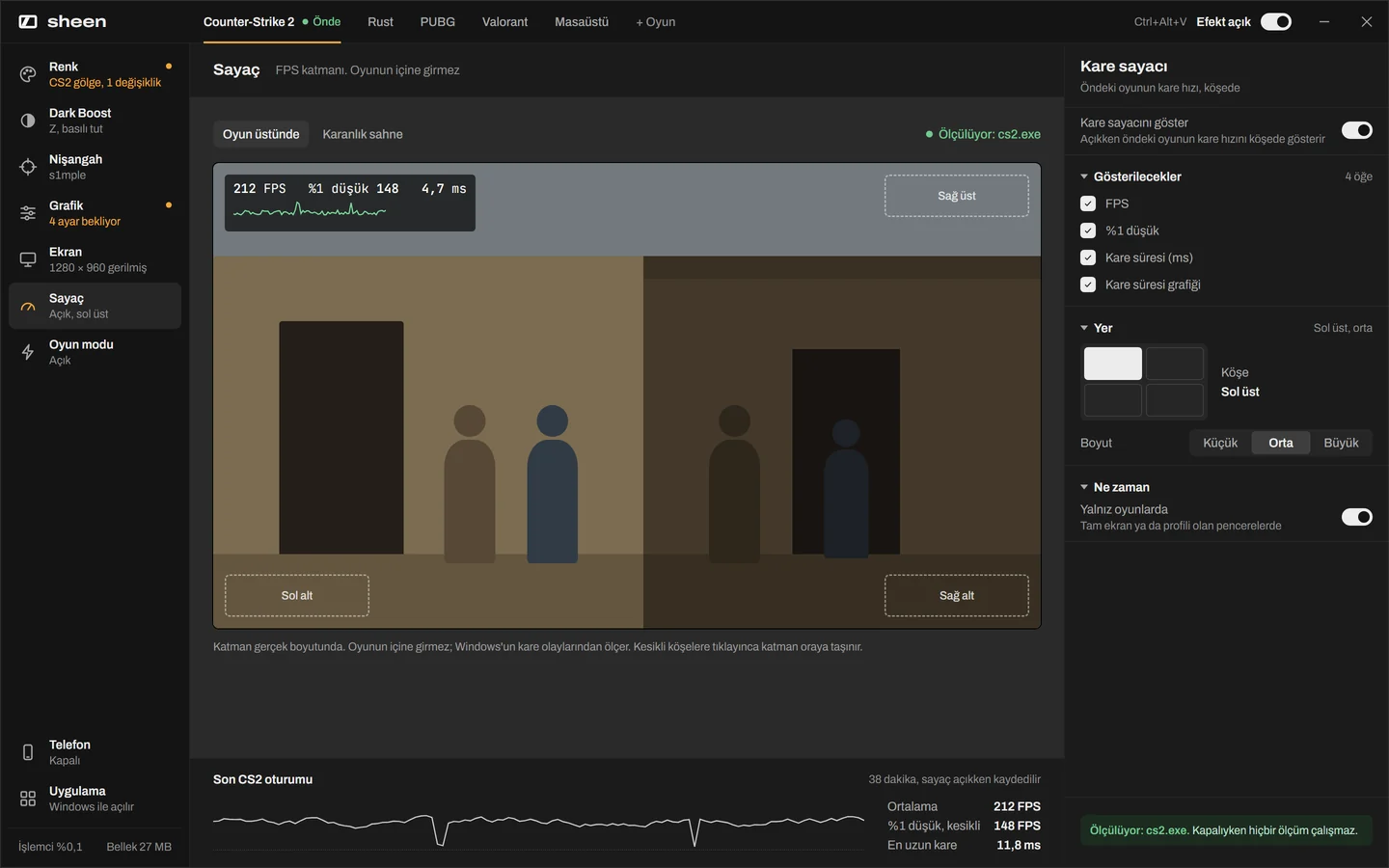
FPS counter and 4:3 stretched, no config hunting. FPS sayacı ve 4:3 gerilmiş, ayar kurcalamadan.
The counter shows FPS, 1% low and frame time in any corner. It reads Windows frame events, so it never hooks the game. Sayaç FPS'i, %1 düşüğü ve kare süresini istediğin köşede gösterir. Windows'un kare olaylarından okur, oyuna kanca atmaz.
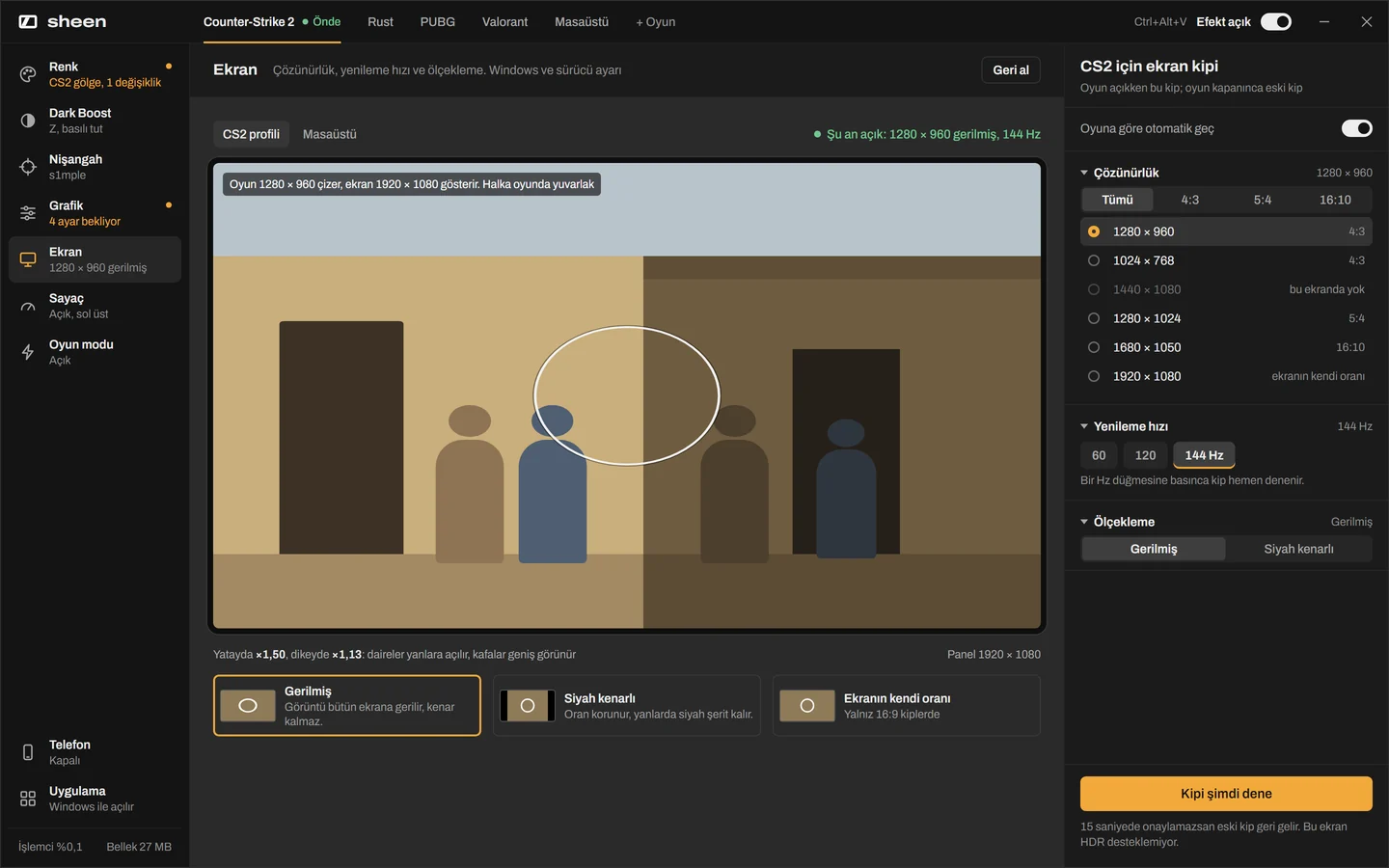
Set 1280×960 stretched for CS2 only. Sheen switches the display mode when the game opens and puts your desktop back when it closes. If a mode doesn't work, it reverts by itself after 15 seconds. 1280×960 gerilmişi yalnız CS2 için ayarla. Oyun açılınca Sheen ekran kipini değiştirir, kapanınca masaüstünü geri getirir. Bir kip çalışmazsa 15 saniye sonra kendiliğinden geri döner.
And a few things you'll use every match. Bir de her maçta kullanacağın birkaç şey.
Is it safe with anti-cheat? Hile korumasıyla güvenli mi?
Sheen never opens the game. No injected DLLs, no hooks, no memory reading. It changes the same Windows and graphics driver settings your NVIDIA or AMD control panel does, and draws its overlays as a normal window on top. Sheen oyunu hiç açmaz. DLL enjeksiyonu yok, kanca yok, bellek okuma yok. NVIDIA ya da AMD kontrol panelinin değiştirdiği Windows ve sürücü ayarlarını değiştirir; katmanlarını üstte duran normal bir pencere olarak çizer.
The only game file it ever writes is CS2's own video settings file, and only while CS2 is closed. That's the same file the in-game menu writes. Yazdığı tek oyun dosyası CS2'nin kendi görüntü ayar dosyası, o da yalnız CS2 kapalıyken. Oyun içi menünün yazdığı dosyanın aynısı.
The honest part: no tool can promise you'll never be banned. Some games' rules forbid brightening dark areas (Rust is one), and another player can report you for it. Vanguard may refuse the high-priority setting. Leagues and tournaments have their own overlay rules; follow them. Dürüst kısmı: hiçbir araç "asla ban yemezsin" diyemez. Bazı oyunların kuralları karanlığı açmayı yasaklar (Rust bunlardan biri) ve başka bir oyuncu bunun için seni şikâyet edebilir. Vanguard yüksek öncelik ayarını reddedebilir. Lig ve turnuvaların kendi katman kuralları var; onlara uy.
Install takes a minute. Windows warns you twice. Kurulum bir dakika. Windows iki kez uyarır.
This beta isn't code-signed yet, so Windows SmartScreen doesn't know the publisher and stops the first launch. That's expected. There's no installer: Sheen is one exe you can keep in any folder. Bu beta henüz imzalı değil; Windows SmartScreen yayıncıyı tanımadığı için ilk açılışı durdurur. Bu beklenen bir durum. Kurulum programı yok: Sheen, istediğin klasörde tutabileceğin tek bir exe.
-
Download Sheen.exeSheen.exe'yi indir
Use the orange button. The file lands in your Downloads folder.Turuncu düğmeyi kullan. Dosya İndirilenler klasörüne iner.
-
Browser warns? ⋯ then KeepTarayıcı uyarırsa: ⋯ sonra Sakla
Chrome and Edge show this for new files. Open the ⋯ menu next to Sheen.exe and choose Keep. Edge may ask once more: Keep anyway.Chrome ve Edge yeni dosyalarda bunu gösterir. Sheen.exe'nin yanındaki ⋯ menüsünü aç, Sakla'yı seç. Edge bir kez daha sorabilir: Yine de sakla.
-
Open it, click "More info"Aç, "Ek bilgi"ye tıkla
The blue window is SmartScreen. The link is under the first sentence.Mavi pencere SmartScreen. Bağlantı ilk cümlenin altında.
-
Click "Run anyway""Yine de çalıştır"a tıkla
Sheen opens and stays in the tray. Windows only asks once.Sheen açılır ve tepside kalır. Windows bunu yalnız bir kez sorar.
To check the file, run certutil -hashfile Sheen.exe SHA256 and compare it with:Dosyayı doğrulamak için certutil -hashfile Sheen.exe SHA256 çalıştır ve şununla karşılaştır: 43a519ea97d41d56307bf8a516b5ad63f59cdaf886bf3b77dbe4e0fa782dd841
Release notesSürüm notları
1.0 beta, October 20261.0 beta, Ekim 2026
- First public beta for friends and testers.Arkadaşlar ve test edenler için ilk açık beta.
- Color and shadow lift with per-game profiles, driver vibrance for AMD and NVIDIA.Oyuna özel profilli renk ve gölge kaldırma, AMD ve NVIDIA için sürücü canlılığı.
- Crosshair overlay with 14 shapes, CS2 codes and pro presets.14 şekilli nişangah katmanı, CS2 kodu ve pro hazır ayarları.
- FPS counter, 4:3 stretched, Dark Boost, game mode, phone control.FPS sayacı, 4:3 gerilmiş, Dark Boost, oyun modu, telefondan kontrol.
- CS2 graphics presets with backup and restore.Yedekli ve geri alınabilir CS2 grafik hazır ayarları.
The interface is being redrawn. The pictures on this page show the new design, so some screens in the current build may look different.Arayüz yeniden çiziliyor. Bu sayfadaki görüntüler yeni tasarımı gösteriyor; şu anki sürümde bazı ekranlar farklı görünebilir.
QuestionsSık sorulanlar
What do I need to run it?Çalıştırmak için ne gerekiyor?
Windows 10 or Windows 11, 64-bit. Driver vibrance needs an AMD or NVIDIA graphics card; on other cards Sheen uses the Windows color table instead.Windows 10 ya da Windows 11, 64 bit. Sürücü canlılığı için AMD ya da NVIDIA ekran kartı gerekir; diğer kartlarda Sheen Windows renk tablosunu kullanır.
Is it free?Ücretsiz mi?
Yes. The beta is free.Evet. Beta ücretsiz.
Will it lower my FPS?FPS'imi düşürür mü?
Color changes are applied by the graphics card itself, so they cost no frames. Sheen does no work while idle and only checks things while a game is in front.Renk değişikliğini ekran kartının kendisi uygular, kare kaybettirmez. Sheen boştayken iş yapmaz; yalnız bir oyun öndeyken kontrol eder.
Which games does it work with?Hangi oyunlarla çalışır?
Color, crosshair, FPS counter, Dark Boost and display modes work with any game. Graphics presets support CS2 for now.Renk, nişangah, FPS sayacı, Dark Boost ve ekran kipleri her oyunla çalışır. Grafik hazır ayarları şimdilik CS2 için.
Why does Windows warn me?Windows neden uyarı veriyor?
The beta isn't signed with a code-signing certificate yet, so SmartScreen sees an unknown publisher. The steps above get you past it once.Beta henüz kod imzalama sertifikasıyla imzalanmadı; SmartScreen bu yüzden yayıncıyı bilinmeyen olarak görür. Yukarıdaki adımlarla bir kez geçersin.
How do I remove it?Nasıl kaldırırım?
Right-click the tray icon and choose Exit, then delete Sheen.exe. Sheen puts your display back to how it was when it exits, even after a crash on the next start.Tepsi simgesine sağ tıkla, Çık'ı seç, sonra Sheen.exe'yi sil. Sheen çıkarken ekranını eski haline getirir; çökme olsa bile bir sonraki açılışta geri yükler.